Safari Guardian
It's your browserSafari Guardian 1.2.2 runs natively on both Intel- and PowerPC- based Macs and requires Mac OS X 10.5 or later.
Safari Guardian does not work with Safari 5.1 on Snow Leopard or Lion. We're looking into possible fixes, but for now, Safari Guardian is only usable on pre-5.1 versions of Safari.
There are at least two things a respectable web site should never do:
And this is not just about being impolite, it's actually outright stupid to annoy users with more or less erratic browser behavior. After all, you want them to come back, right? Still, some web designers just don't get it.
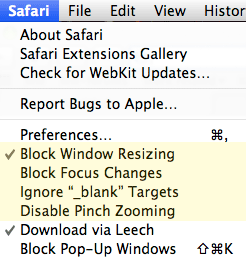
New menu items put you in control
That's why most browsers have controls to switch off that kind of offensive behavior. Safari, however, only has a hidden preference for redirecting new-window links to new tabs, while there's no way whatsoever to disable those other two annoyances.
That's precisely the gap Safari Guardian fills. While there's now an official Safari plug-in interface for Safari 5, we chose to implement this as a SIMBL bundle (see note below), so it works with Safari 4 and Safari 5 (there is a slight drawback to this solution; see below for details). Install Safari Guardian, configure it in Safari's "Safari" menu, and make both unsolicited JavaScript window resizing and those new "_blank" windows go away. (New windows opened via JavaScript will still be there. Sorry.)
By the way, in addition to disabling the above-mentioned Safari features, Safari Guardian can also keep Safari from bringing browser windows/tabs to the front via JavaScript, and you can configure Safari to ignore that "Pinch" gesture that often makes you zoom web pages involuntarily when all you wanted to do was a simple two-finger scroll.
Why is having to use SIMBL a drawback? Here's the gist: SIMBL bundles are input managers. More precisely, they are software bundles that are injected into applications by a meta input manager (namely SIMBL), and that's a safety plus in comparison to stand-alone input managers. But they still are hacks, and as such, they represent an unofficial back door to implementing plug-ins, which may break with any Safari or system update.
In a way, choosing between input managers and JavaScript window resizing means picking the lesser of two evils. And if you don't feel capable of properly assessing the risks of using an input manager, you may be better off not using Safari Guardian at all.
 Many Tricks
 Download